Rising Multipliers
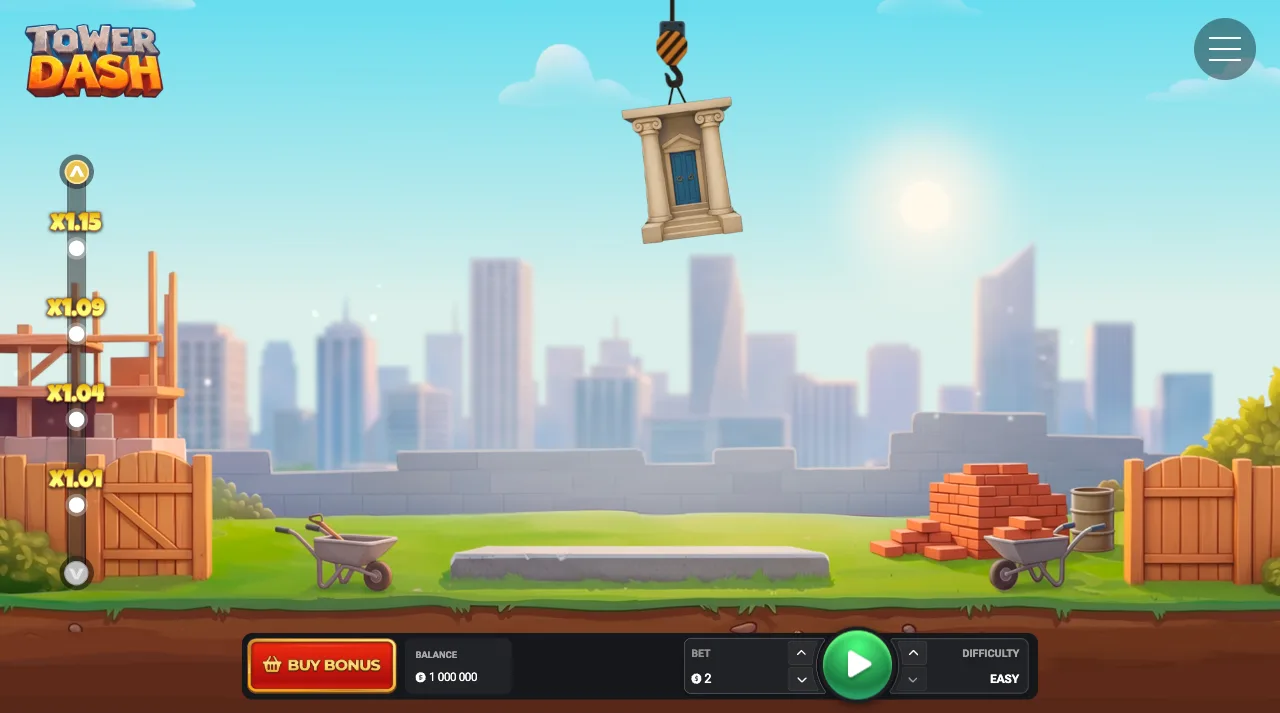
The ladder beside the tower rises with every placed block. On Easy a sample round starts at x1.01, x1.04, x1.09, x1.15, x1.21 and x1.28.
Six sample values from an Easy round.
Anatomy of a round
A round repeats one decision while the multiplier rises: drop another block or cash out. Below, one round runs from the stake to the cash out or the fall, with what the difficulty setting fixes.
Tower Dash is an instant tower-building game from InOut Games. A round is decided by whether each dropped block is placed, and a crane and a stack of blocks replace reels.
The lines below describe what happens after you press Play.
The return to player is 95.5%.
Every round of Tower Dash runs the same six steps in a loop. They are listed in the order the client presents them.
The bet and the difficulty are both chosen before the round. The game accepts bets from 0.12 to 100 USD.
A block arrives on the crane hook above the stack and swings across it. Watching one full pass ahead of the first tap is free.
Pressing Play drops the block. On a desktop the Space key does the same.
A placed block moves the multiplier one step up and brings the next block. A block that falls ends the round at that height.
After each successfully placed block the Cash Out button is live and shows the amount it would pay.
Pressing the button pays the current multiplier and ends the round. Dropping another block restarts the loop one floor higher.
The four mechanics from the format page, described here by the step of the round they affect.
The ladder beside the tower rises with every placed block. On Easy a sample round starts at x1.01, x1.04, x1.09, x1.15, x1.21 and x1.28.
Six sample values from an Easy round.
Cash Out is the only action that turns the multiplier on screen into a payout. It is offered after each placed block and waits for your tap.
Manual, so you choose the moment. A block that falls before Cash Out ends the round.
The release is the player's only input during the round. The stake and the difficulty were both set ahead of the first block.
One tap per block, or the Space key on desktop.
The setting fixes the maximum tower height, the chance of placing a block and the potential payout. Easy allows up to 40 blocks, Medium 38 and Hard 35.
Chosen before each round.
A single round says very little about the game. The 95.5% return figure describes the game across far more rounds than any session contains.
95.5%Return to player
Difficulty is chosen before each round, and the 95.5% figure is listed for the game as a whole.
The provider's demo is embedded below in a frame that loads on request. It starts straight away with a fun balance of 1 000 000, so the whole loop can be gone through on play money.
Hosted by InOut Games. Fun balance only, so every round in the frame is practice.
The real-money game opens through our partner, in a browser or from the Tower Dash app, and the round runs the same way in both.
Mechanics, timing and the difficulty setting, from the stake to the cash out.
The loop is short
Pick a block number in the demo, keep to it once, and then use the same number in a staked round.
Most descriptions of Tower Dash concentrate on the drop, because the drop is the part that moves. The step with the most choices in it comes earlier.
Before the round you set an amount and a difficulty. After that, the controls are one tap per block and the Cash Out button. The difficulty fixes the maximum tower height, the chance of placing a block and the potential payout, so it shapes the whole round.
An exit block is easiest to choose at this stage, before any multiplier is on screen. Naming a block number before the first drop gives the round a stopping point that was set without pressure.
The crane holds a block above the stack and swings it from side to side. New players often release as soon as the block looks roughly centred.
Letting a full pass go by before the first drop is free and shows the rhythm. From the second block onwards you are timing against a swing you have already watched. On a desktop the Space key drops the block, which some players find steadier than a mouse click.
Each difficulty setting carries its own chance of placing a block, so timing and setting work together. Easy moves its blocks slowly and leaves the widest margin, Medium moves faster, and Hard moves fastest with the narrowest placement window and the highest multipliers. The embedded demo is the place to test the timing on fun balance. For a staked round, open the game at the operator.
After each placed block there is a pause before the next one arrives. In that pause the Cash Out button is live and shows the amount it would pay.
A round that continues past the planned exit block usually does so because the button was not read. The multiplier was rising and the next block was already on the hook.
Reading the button after every block is a habit the demo can build for free. Reading it is separate from pressing it. It means the decision to continue is made with the payable amount in view.
The three settings are chosen before the round and hold until it ends. Easy allows a tower of up to 40 blocks, Medium 38 and Hard 35, and each setting has its own chance of placing a block and its own potential payout.
The setting can be changed between rounds. A calmer moment to change it is after a few rounds, so that the plan and not the last result makes the choice. Comparing the three ladders in the demo first gives a steady basis.
The 95.5% return figure covers the game as a whole, so the advice here is about behaviour. Pick the setting on which you still read the Cash Out button after every block, then play three rounds on it before judging it.
A round finishes in one of two ways: you press Cash Out, or a block falls. The first is available after every placed block.
A round cashed out at a low multiplier has done what was planned for it. The two bonus buys work differently, because they build automatically in Medium mode: Touch the skies! at 50 times the bet pays the multiplier of the last completed floor after three attempts, and Build your city! at 100 times the bet pays the sum of the completed towers. In an ordinary round the exit stays manual. Name a block, start a tower, and press the button when you reach it.